Tools
A tool is a typed command that an agent calls through Golem, such as bash, npm install, tsc, or a tool you write. Tools are how an agent runs shell scripts, edits files, installs packages, compiles code, and fetches web pages, without a container or VM and without access to the agent’s memory.
Golem ships a set of built-in tools, and you can write your own in any Golem SDK.
Agent frameworks use the word “tool” for any function that the model may call. Your agent loop can offer the model three kinds:
- Golem tools, described on this page: components that Golem runs in a sandbox, with permissions and middleware applied.
- Imported MCP tools: tools of an external MCP server, which Golem calls on the agent’s behalf. The server runs them.
- Functions in your own agent code: ordinary agent code, durable like the rest of the agent, as described in Durable execution.
How an agent loop uses tools
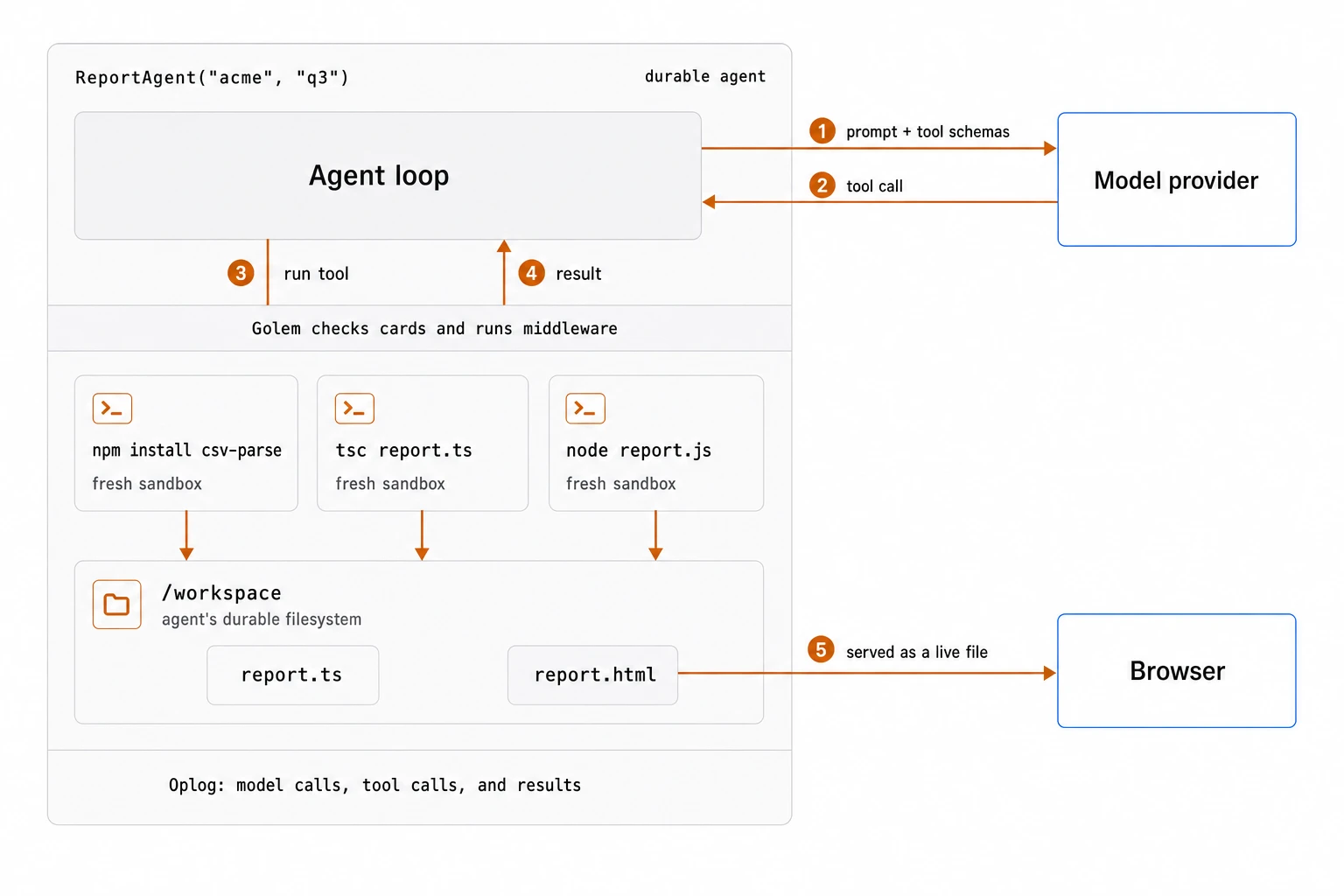
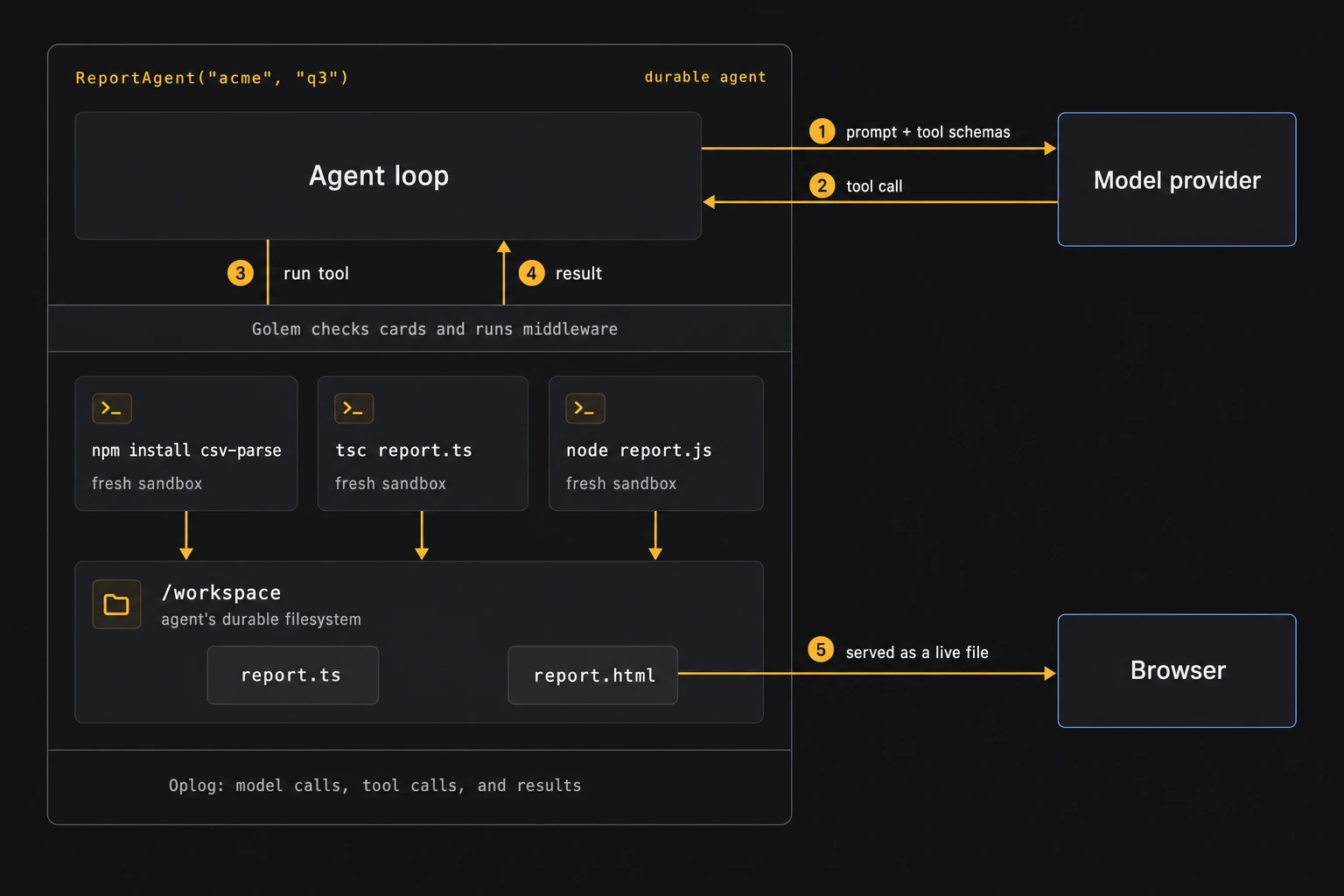
- The agent loop lists the Golem tools bound to the agent, which the SDK exposes with their JSON schemas, and sends the schemas to the model together with the prompt.
- The model answers with a tool call, such as
npm install csv-parse. - The loop calls the tool through its generated client. Golem checks the agent’s permissions, runs any middleware, and runs the tool in a fresh sandbox on the agent’s filesystem.
- The result goes back to the loop, which sends it to the model and continues.
With a framework such as the Vercel AI SDK, each Golem tool becomes one of the framework’s tools, whose execute function calls the Golem tool’s client. For example, in TypeScript with the Vercel AI SDK, inside an agent method:
// Excerpt: the Vercel AI SDK inside a Golem agent method
const result = await generateText({
  model: openai("gpt-4.1"),
  prompt: question,
  tools: {
    echo: tool({
      description: "Repeat a value",
      inputSchema: z.object({ value: z.string() }),
      execute: async ({ value }) => echoClient.echo({ value }),
    }),
  },
  stopWhen: stepCountIs(12),
});
The model calls are HTTP requests and the tool calls are Golem tool calls, so both are recorded in the agent’s oplog without any changes to the framework code. Files that tools write stay in the agent’s filesystem. The agent can serve them, for example as a web page, as described in Artifacts.
 Open full-size image in a new tab.
 Open full-size image in a new tab.
How a tool call runs
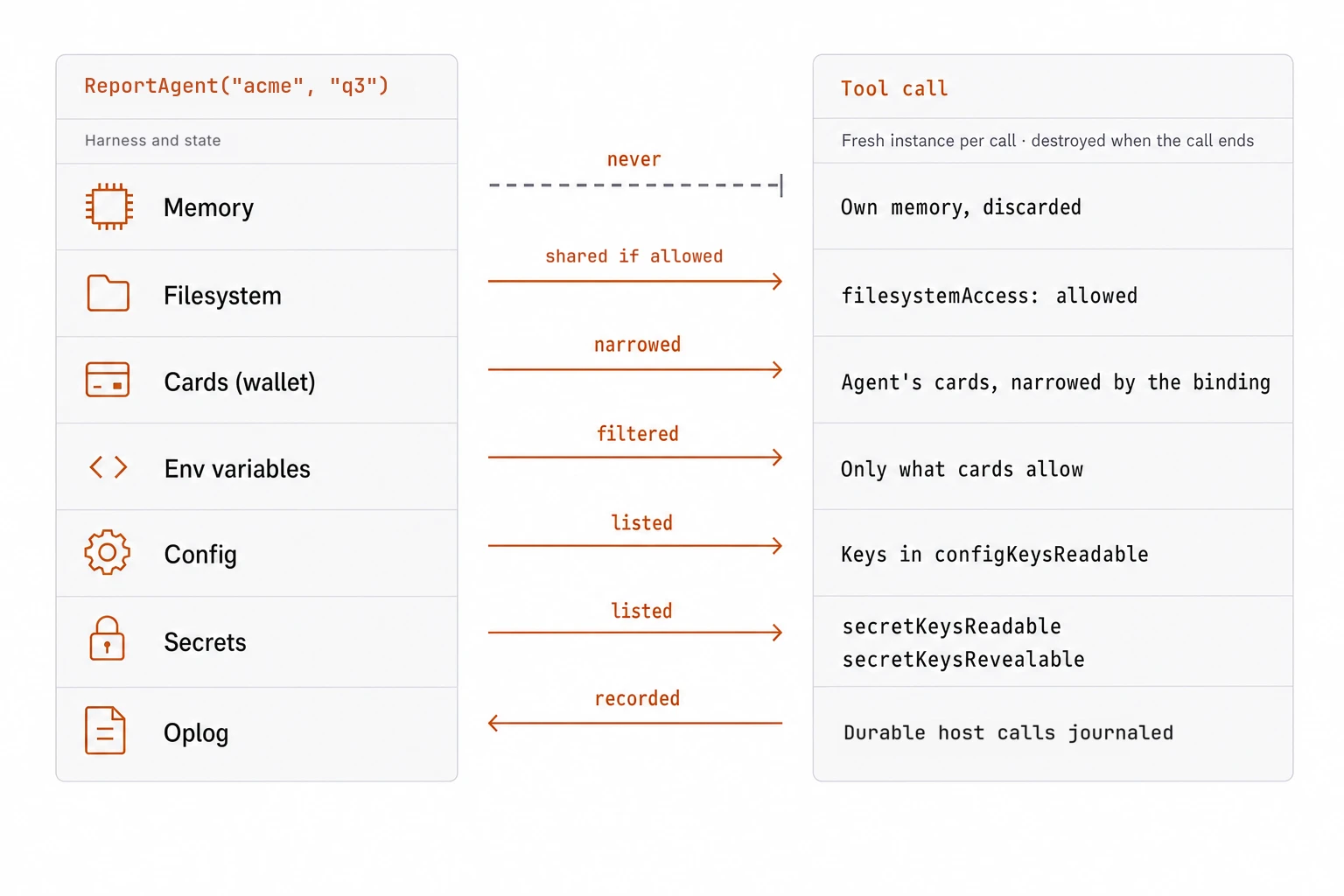
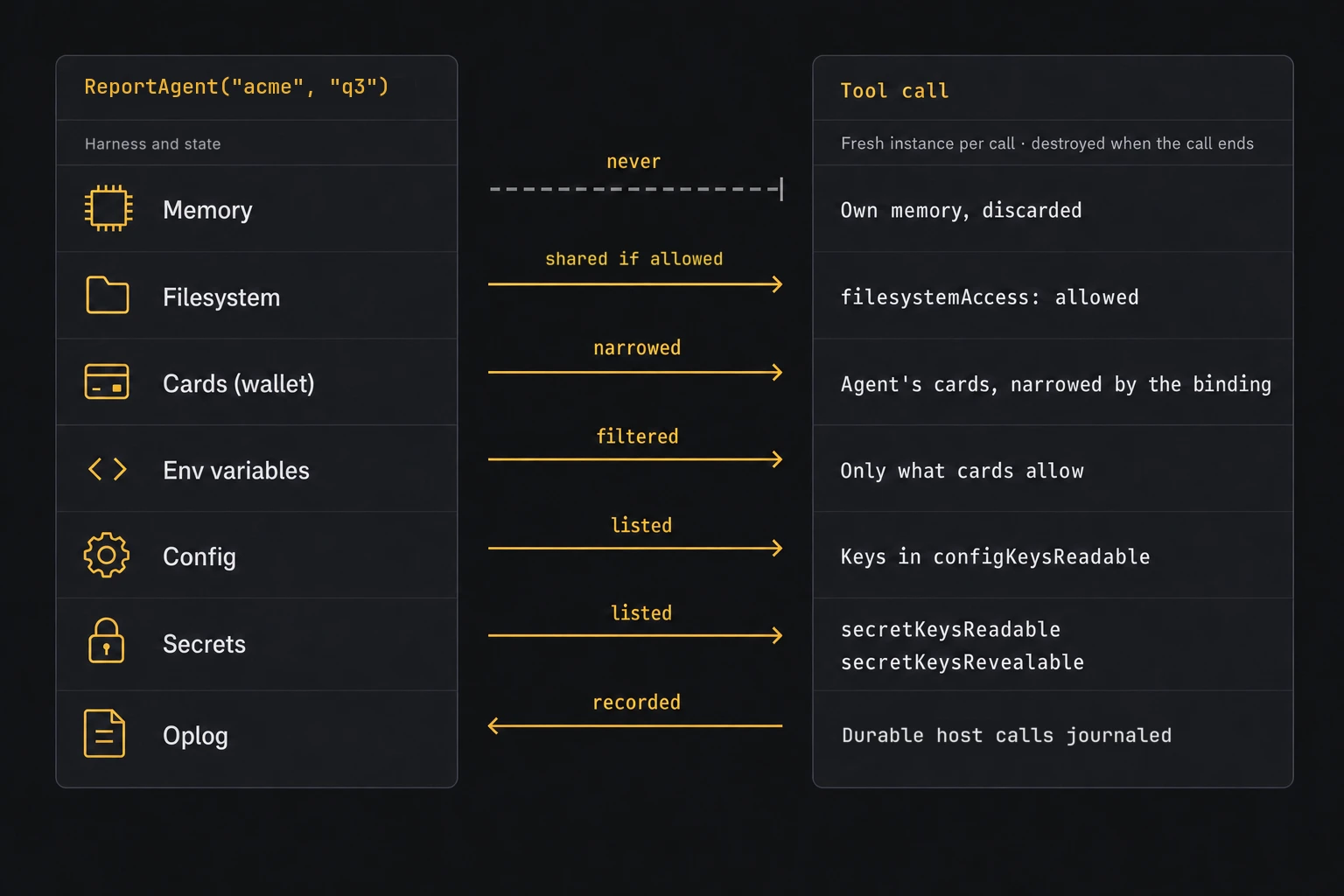
Each call to a component tool runs in a fresh WebAssembly sandbox, created for that call and destroyed when it ends. The tool cannot read the calling agent’s memory, so code generated by a model and run through a tool cannot inspect or change the agent loop that launched it.
If the agent allows it, the tool works directly on the agent’s own filesystem. The agent can write a source file, run tsc on it, and read the compiled output, all on the same durable disk.
A tool call runs to completion and leaves nothing running: no process survives between calls, so a tool cannot keep a server running in the background. State that must last goes into files. The bash tool, for example, keeps only the working directory between calls. To make something an agent built available to users, serve it as an artifact: files from the agent’s filesystem, backed by endpoints on the agent.
 Open full-size image in a new tab.
 Open full-size image in a new tab.
Tool calls are part of the agent’s durable execution. Every tool call executes exactly once: if a server fails in the middle of npm install, the agent recovers and the same tool call completes, without starting a second install. The tool records its external interactions, such as the packages it downloads, in the calling agent’s oplog. During recovery, Golem runs the tool’s code again against those recorded results, which rebuilds the files the tool wrote without downloading anything twice, and then the call continues where it stopped. A request that was still in flight when the server failed follows the same rules as any other outgoing HTTP request.
Built-in tools
| Tool | What it does |
|---|---|
bash | A bash-compatible shell with coreutils, curl, and wget. Other tools bound to the agent can be called as commands. |
read-file, write-file, edit-file, ls, grep | Read, write, edit, list, and search files |
node | A Node.js-compatible JavaScript runtime that also runs TypeScript files and -e source without flags (no type checking) |
npm, npx | The npm package manager. When tsx or ts-node is not installed, npx tsx and npx ts-node run through node |
tsc | The TypeScript compiler |
python | Python scripts and modules in RustPython, with a frozen standard library. Native extensions, subprocesses, and sockets are unavailable. |
git | Local repositories and HTTP(S) remotes: clone, fetch, push, pull, merge, and linear rebase. SSH, repository hooks, and external credential helpers are unavailable. |
web-fetch | Read-only HTTP GET of a web page |
path-policy | Middleware with per-directory read, write, and delete rules for the file tools |
The Git tool supports HTTP(S) remote workflows, not the SSH or git:// transports. For an authenticated remote, bind an invocation-scoped opaque secret named authentication with the fields origin, and optional username, password, bearer, or headers. The origin limits which server can receive those credentials; the tool does not store them in repository configuration or forward them across an origin-changing redirect. A failed push can have succeeded on the server before its response was lost. Inspect the remote refs and reconcile the result before retrying; external Git servers do not provide Golem’s exactly-once invocation guarantee. See the Git tool contract for supported commands and limitations.
To call an existing built-in tool from an agent, follow Generate typed clients for existing tools. It shows release selection, generation, consumer imports, and the deployment binding. The same guide covers MCP imported tools without copying their schemas.
Writing a tool
A tool is defined like a command-line program with types: commands, positional arguments, options and flags, input and output streams, a typed result, and declared errors. This tool has one command that takes a value and returns it:
TypeScript
import { ok, toolDefinition } from "@golemcloud/golem-ts-sdk";
import { z } from "zod";

export const echo = toolDefinition("echo")
  .version("1.0.0")
  .body((body) => body.positional("value", z.string()).returns(z.string()));

echo.implement({
  echo: async ({ value }) => ok(value),
});Agent code calls a tool through its typed client. This is what an agent loop runs when the model chooses the tool:
TypeScript
import { toolClientDefinition } from "@golemcloud/golem-ts-sdk";

const client = toolClientDefinition(echo).client("echo");
const value = await client.echo({ value: "hello" });A tool can be written in any Golem SDK language, and an agent can call tools written in any language. From one definition, Golem generates a typed client for each SDK, CLI help, a REST endpoint, and an MCP tool. Use a tool for stateless operations that should run in a fresh sandbox under the caller’s permissions; use an agent for something with its own identity and state.
Giving an agent a tool
An application declares the tools it uses, and an agent can only call tools that are bound to it in golem.yaml. The binding also decides what the tool may access on the agent’s behalf:
# golem.yaml (excerpt)
tools:
  bash: # the built-in bash tool, provisioned in every Golem installation
    release: { account: builtin-tool-owner@golem.cloud, name: bash, version: "0.2.1" }
agents:
  ReportAgent:
    tools:
      bash:
        filesystemAccess: allowed # the tool may use the agent's filesystem
        secretKeysRevealable: [] # the tool may not reveal any secret values
A binding can also list the configuration keys and secrets a tool may read (configKeysReadable, secretKeysReadable). A binding can only narrow access. The tool acts with the calling agent’s permissions, its permission cards, and a call succeeds only if the agent is both bound to the tool and permitted to use it.
Middleware
Middleware wraps tool calls and runs on every call. You configure it in golem.yaml, and Golem enforces it; agent code cannot list, remove, or bypass it. Typical middleware approves or rejects calls based on their arguments, waits for human approval before an irreversible action, redacts output, writes audit records, or enforces rate limits. Because middleware runs inside the durable agent, an approval step can wait hours for a person and survive restarts.
Middleware cannot widen what an agent may do. Each call that middleware passes to the next layer is checked against the calling agent’s permissions again, with the command and arguments that the next layer receives. If middleware changes a command or its arguments, the agent needs permission for both the command it called and the command the middleware produces.
Middleware and generated dependency clients
Middleware can present a different tool definition to the caller, including different commands, arguments, results, and errors. For tool dependencies in components.<name>.dependencies.tools, golem build generates the client from the selected environment’s middleware-presented definition. This applies to Rust, TypeScript, Effect TypeScript, Scala, MoonBit, and Go. The generated package keeps the bound tool’s name, and calls still use that name to look up the tool at runtime.
The build compiles local middleware components and extracts their metadata before it generates clients for their consumers. Explicit guest bridge requests use the same presented definition as dependency clients. If a local middleware declaration omits component, the build discovers its provider from compiled metadata. It must inspect the other components to reject duplicate providers, so this can require building components outside the selection and their dependencies. A known presentation can unlock consumers while discovery continues, but incomplete discovery or a duplicate provider fails the build. Later builds regenerate clients when the presented definition changes, even if the underlying tool does not change.
Middleware scope is available only after compilation. If a component needs a presented client to compile, but that client’s middleware metadata can only be extracted from the same blocked component, the build reports an unresolved metadata or build dependency cycle. It does not assume that the middleware is Universal or generate a raw fallback client. A gen-bridge-only build requires existing artifacts for its metadata sources and reports missing artifacts instead of silently retaining old clients.
After compilation, the build validates component-baseline bindings and agent overrides, including callers that reach the client through declared tool dependencies. Nested tool calls keep the caller’s owner and bindings; an agent RPC starts a new owner. An override must preserve the environment’s presented definition. Logging or policy middleware that leaves the definition unchanged is allowed. An override that changes the definition causes the build to fail with the owner, component, and tool names.
For example, suppose the environment wraps search with an adapter that presents find(query: string) instead of search(pattern: string). The generated dependency client exposes find, but calls the tool bound as search. An agent override that removes the adapter with middleware: [] and middlewareMergeMode: replace is rejected: that agent would receive search, while the generated client expects find. A second build does not change this restriction. Put the presentation adapter in the environment binding and keep any component or agent overrides consistent with it.
Choosing where code runs
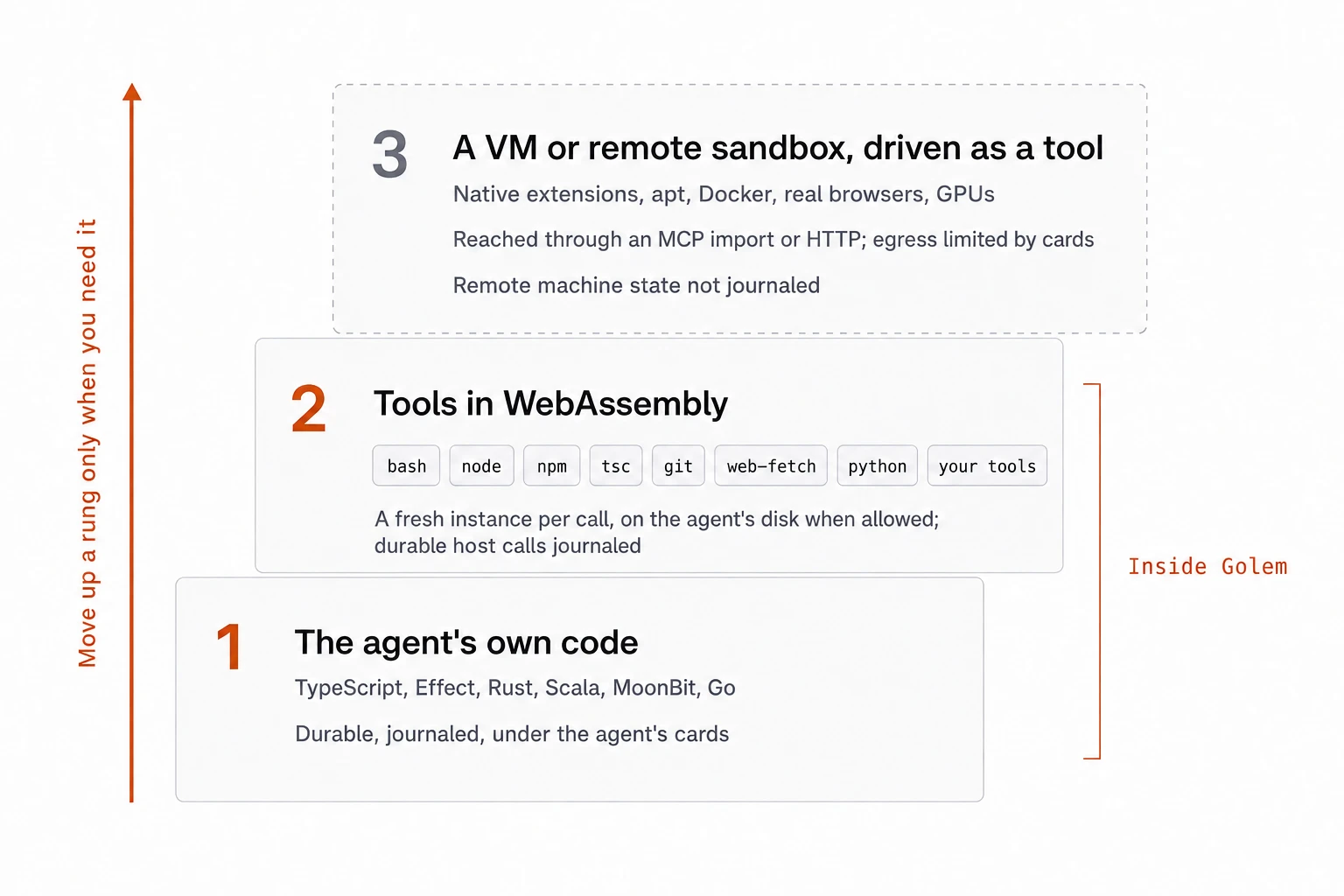 Open full-size image in a new tab.
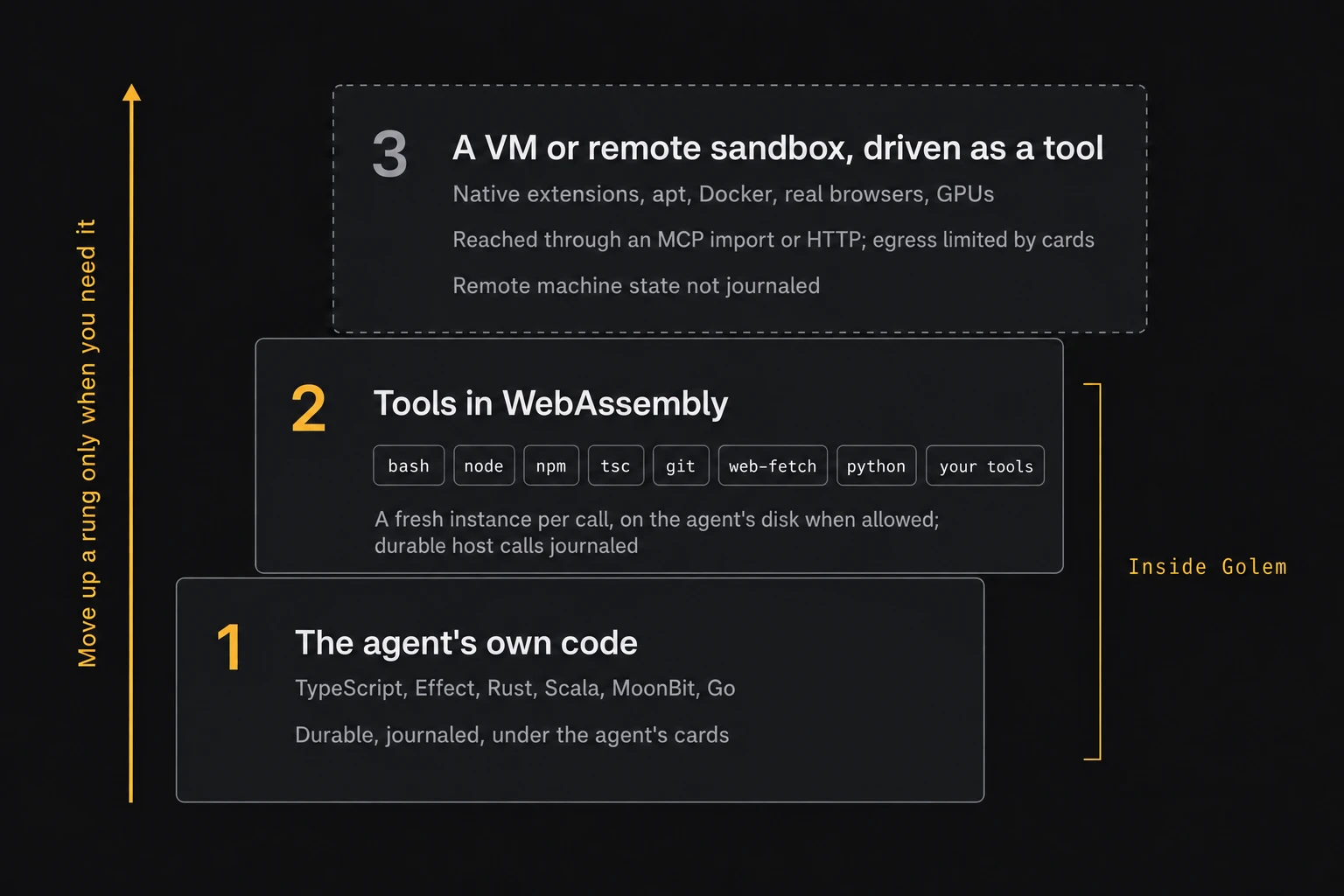 Open full-size image in a new tab.
- The agent’s own code handles logic, state, and model calls.
- Golem tools handle shell scripts, files, Node.js, npm, TypeScript, git, and Python through RustPython. The work happens on the agent’s durable filesystem, and no separate machine has to stay running between calls. The Python tool does not support native extensions, subprocesses, or sockets.
- A remote sandbox or VM handles native binaries and extensions, system packages, Docker, real browsers, or GPUs. Use it for Python workloads that require capabilities the built-in tool does not provide. The agent calls it over HTTP or MCP, and its permissions must allow the connection. Golem records the calls and their results, but not the state of the remote machine.
MCP and sharing tools
- MCP import: tools from an existing MCP server can be bound and called like Golem tools, with typed clients. Each call runs on the upstream server; Golem records the call and its result in the agent’s oplog.
- MCP export: an application can expose its tools as an MCP server for other clients.
- Publishing: a tool can be published as a versioned release that other environments and accounts can use.
- From the CLI:
golem tool invokecalls a tool as a given agent, andgolem sshopens a prompt where each line runs as abashtool call under that agent’s permissions.
Next
Permissions: how Golem decides which tool calls and other operations an agent may perform.
Related guides: